

Cango App: the mobile app for first-timers
Updated: 10 November 2026
Kiwi players looking for a cango app will not find a native package in the Apple App Store or Google Play. Instead, Cango runs as a Progressive Web App (PWA) directly through your mobile browser. You pin a shortcut to your phone screen, and it opens in a full-screen window without the browser address bar. Because NZD is not offered in the cashier, mobile accounts run in AUD or EUR, so all figures on this page appear in AUD. The web app gives full access to the pokies lobby, cashier, and live chat.
Cango casino app: install summed up
Setting up the cango casino app takes less than a minute and uses almost no storage space on your handset. Because there is no heavy binary file to download, the interface loads assets on the fly as you browse the pokies or open the cashier. Below is the exact setup path for each device type.
| Device | Steps | What you need |
|---|---|---|
| iPhone (Safari) | Open the site in Safari, tap Share at the bottom, select Add to Home Screen, then tap Add | iOS device with Safari browser and an active internet connection |
| iPhone (QR code) | Open the app page on another screen, scan the QR code with the iPhone camera, then follow the Safari prompt | iPhone camera and Safari set as the default browser |
| Android (Chrome) | Open the site in Chrome, tap the three-dot menu in the top corner, tap Install app or Add to Home screen | Android handset with Chrome and standard home screen permissions |
| Desktop | Open the site in Chrome or Edge, click the install icon in the right side of the address bar, then confirm | Windows or Mac computer with a Chromium-based browser |
Once the icon sits on your screen, tapping it launches the lobby straight away. You can log in with your email and 8+ character password or use Google sign-in. From the mobile view, you can trigger the welcome pack with code WP1 on a minimum deposit of $45 AUD (150% up to $1,500 AUD plus 300 free spins across Bonanza Billion, Thunder Coins XXL, and 3 Super Hot Chillies), browse over 3,000 games according to the casino, or request a cashout starting from $30 AUD.
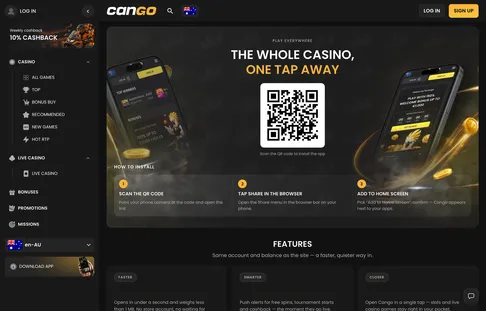
The install page shows the QR code and the steps for iPhone and Android. Scan it with the phone camera and the casino opens in Safari, ready for Add to Home Screen.
Cango app: when the install fails
Sometimes the cango app shortcut does not behave as expected on the first try. Because a PWA relies on your mobile browser settings and local cache rather than a store installer, small system quirks can block the icon or log you out between sessions.
- The icon did not appear on the home screen. This usually happens if you opened the site inside an in-app browser (such as a link clicked inside a social media feed or email client) or used a third-party browser on iOS. Apple only allows home screen web apps through Safari, while Android works best with Chrome. Check also if your home screen layout is locked in your phone settings, which stops new icons from placing.
- Logged out after an update or closing the window. When iOS or Android runs a system update, it often clears temporary web storage. If the app forgets your session every time you close it, check that cookies and site data are enabled for your browser. Do not turn on a VPN to fix connection drops, as VPN use is banned under the site rules and can lock your account.
- Browser cache stalls the lobby or cashier. If game tiles in categories like Hot RTP, Bonus Buy, or Megaways fail to load their graphics, or if the cashier spinner hangs when you try to make a $15 AUD minimum deposit, your cached files may be outdated. Clear the browser cache from your phone settings (leaving saved passwords intact if you wish) and reload the app from the home screen icon.
- Private or Incognito mode blocks the prompt. Browsers hide the Install app and Add to Home Screen buttons when you browse in Private or Incognito tabs. Private tabs isolate session data and delete it on exit, so the phone cannot build a permanent shortcut. Switch to a standard browser tab before you start the setup.
If a technical glitch persists inside the mobile interface, tap the 24/7 live chat button in the menu. Support agents reply within about 2 minutes and can check if your account session is stuck on their side.
Cango mobile: Safari install steps
Apple restricts external code packages on iOS, so the cango mobile setup runs entirely through Apple’s own WebKit engine inside Safari. Our Cango casino overview lists what the casino offers, and on an iPhone or iPad the installed app gives you the exact same game categories, Collections (such as Asia, Egypt, and Wild West), and Sumsub verification tools as desktop users.
- Open the Safari browser on your iPhone or iPad and navigate to the casino homepage in a standard (non-private) tab.
- Alternatively, if you have the site open on a laptop, go to the casino’s app page from the main menu and point your iPhone camera at the on-screen QR code to open the link in Safari.
- Look at the bottom centre of the Safari toolbar and tap the Share icon (the square with an upward-pointing arrow).
- Scroll down the grey action sheet until you see the row labelled Add to Home Screen, then tap it.
- Check the shortcut name (you can leave it as Cango) and tap the blue Add button in the top right corner of the screen.
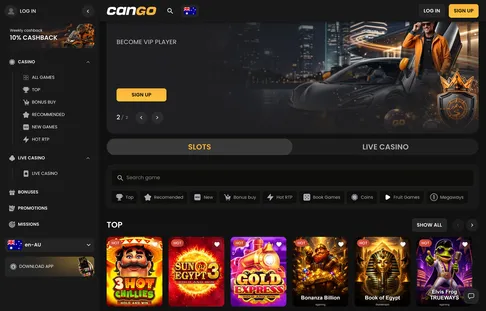
Safari will close and drop you back on your iOS home screen with the new icon in place. When you open the shortcut, the top URL bar and bottom Safari navigation arrows disappear, giving pokies like 3 Hot Chillies, Sun of Egypt 3, and Elvis Frog TRUEWAYS the full vertical height of your display. You can also flip the Slots / Live Casino switch at the top of the lobby to play Lightning Roulette or Crazy Time in portrait or landscape mode.
Once installed, the app opens straight on the home screen of the casino, with the same lobby, cashier and live chat as the desktop site.
Cango download: Android install
Searching for a cango download on an Android phone will not give you an APK file, and you should avoid third-party sites claiming to host one. There is nothing in Google Play either; instead, Chrome packages the site into a secure WebAPK on your handset so it acts like a native programme in your app drawer.
- Launch Google Chrome on your Android phone or tablet and load the casino homepage.
- Wait two or three seconds for the page header and lobby thumbnails to finish loading so the browser recognises the PWA manifest.
- Tap the three vertical dots in the top right corner of Chrome next to the address bar to open the browser menu.
- Tap Install app (on older Android versions or alternative browsers, this line reads Add to Home screen).
- A small system box will pop up showing the Cango icon; tap Install to confirm.
After a few seconds, Android places the shortcut both on your main screen and inside your main app drawer alongside your other programmes. Inside this Android view, you have full control over your account, including the Missions tab, VIP Club steps (verifying your phone number and making qualifying deposits), and responsible play settings like deposit limits or time-outs. For example, as an illustration of mobile cashier use, if you deposit $45 AUD via Visa, Mastercard, or crypto on your Android phone with code WP1, the $67.50 AUD bonus (150%) lands in your balance immediately, giving you $112.50 AUD total to play with under the x30 wagering rule.
Cango casino app: answers in brief
Is there a Cango app in the App Store or Google Play for Kiwi players?
The casino provides a progressive web application rather than a store download. On an iPhone, you open the site in Safari, tap the Share button, and choose Add to Home Screen. On an Android phone, you open the site in Chrome and select the Install app option from the browser menu.
Can I claim the welcome bonus and play pokies on Cango mobile?
All lobby categories, including Megaways, Bonus Buy pokies, and Live Casino tables, work directly in the mobile web app. Kiwi players can enter the promo code WP1 during a first deposit of at least $45 AUD to claim the 150% match up to $1,500 AUD and 300 free spins. Free spins arrive in three daily batches of 100 for Bonanza Billion, Thunder Coins XXL, and 3 Super Hot Chillies, with x30 wagering and a typical 7-day completion window.
How do deposits and withdrawals work on the Cango casino app?
Because accounts do not support New Zealand dollars, mobile balances are held in AUD or EUR. You can deposit from $15 AUD using Visa, Mastercard, alternative cashier methods, or cryptocurrencies like BTC, ETH, USDT, and LTC, while payouts start at $30 AUD up to $8,000 AUD per week. Withdrawals go through a pending window of up to 24 hours and processing of up to 24 hours, after which crypto usually arrives within 1 hour and card transfers take 1 to 3 business days.
Can I verify my account and contact support from my phone?
You can complete the Sumsub verification check on your handset by uploading a photo ID, a proof of address under 90 days old, and a selfie with your document. Verification typically takes 24 to 48 hours, and using a VPN on your mobile device is strictly prohibited. If you need help or want to set account limits, 24/7 live chat is built into the mobile interface and replies within about 2 minutes.